Webhook Service
Overview
The Webhook Service provides reliable, asynchronous delivery of event data from our backend to your configured webhook endpoints. Rather than relying on real-time SDK callbacks, this service delivers structured event notifications (such as status updates, receipt processing results, or other business events) to your server via HTTP webhooks, offering enhanced reliability, delivery guarantees, and robust retry mechanisms.
Key Benefits
- Reliable Delivery: Automatic retry logic with exponential backoff ensures your data is delivered (See: Failure Handling for more details)
- Asynchronous Processing: Decouple receipt processing from user interactions for better performance
- Audit Trail: Track all delivery attempts and status changes for debugging and compliance
- Flexible Configuration: Subscribe to specific event types and customize webhook headers
- Reprocessing Support: Request redelivery of historical receipts when needed
How It Works
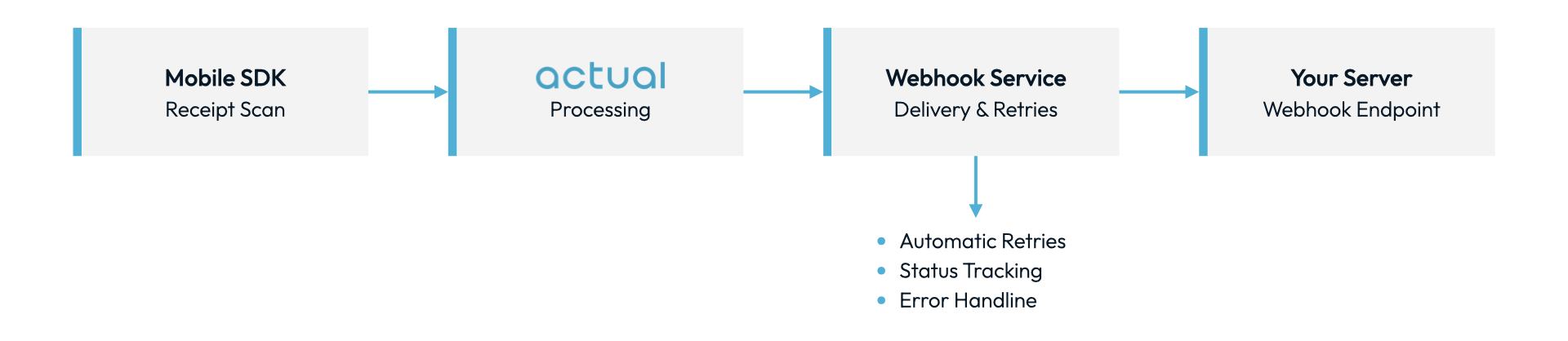
- Your mobile app scans a receipt using our SDK
- Receipt data is processed by on our server
- The Webhook Service delivers the data to your configured endpoint
- Your server receives the webhook and processes the receipt data
- If delivery fails, the system automatically retries with exponential backoff
Getting Started
Prerequisites
- Active Actual client account
- API and SDK credentials (API and SDK keys)
- HTTPS endpoint capable of receiving webhook POST requests
- Valid SSL certificate on your webhook endpoint
Go-Live Checklist
- Build Your Wehhook handler - See Receiving Webhook Events for more details
- Analyze Event Types - Choose which events you want to receive (See: Event Types for more details)
- Configure Your Webhook Endpoint - See Webhook Configuration
Receiving Webhook Events
Webhook Request Format
When an event occurs, our system will send a POST request to your configured webhook URL.
Headers
POST /webhooks/microblink HTTP/1.1
Host: your-domain.com
Content-Type: application/json
X-Webhook-ID: webhook-id-123
- Custom headers: Any headers you configured will also be included
Webhook Payload Structure
{
  "version": 1,
  "payload_type": "ReceiptProcessed",
  "payload_data": {
    // Structure depends on payload type
    // See Event Types section for details
  }
}
Field Descriptions
| Field | Type | Description |
|---|---|---|
version | number | Payload type version |
payload_type | string | The type of payload (matches your subscription) |
payload_data | object | Payload data |
Responding to Webhooks
Your endpoint must respond to webhook requests to indicate successful receipt.
Success Response
Respond with HTTP status code 200-299 to indicate successful receipt:
HTTP/1.1 200 OK
Content-Type: application/json

{
  "received": true
}
Response Requirements:
- Must respond within 30 seconds (timeout)
- Status code must be 2xx (200-299)
- Response body is optional but recommended for debugging
Failure Handling
If your endpoint:
- Returns 4xx or 5xx status code
- Times out (>30 seconds)
- Is unreachable
Our system will automatically retry with the following schedule:
| Attempt | Wait Time | Timeout |
|---|---|---|
| 1 (initial) | - | 30 seconds |
| 2 (retry 1) | 5 seconds | 30 seconds |
| 3 (retry 2) | 15 seconds | 30 seconds |
| 4 (retry 3) | 45 seconds | 30 seconds |
After 3 failed retry attempts, the webhook is marked as failed and moved to a dead letter queue for manual investigation.
Idempotency
To ensure reliability, you should design your webhook handler to be idempotent. This way, if the same webhook payload is delivered multiple times (such as during rare retry scenarios after network issues), your system can safely handle or ignore duplicates without unintended side effects.
Event Types
Subscribe to specific event types to receive only the data you need. Event types follow the Camel Case format.
Available Event Types
| Event Type | Description | Version |
|---|---|---|
RewardUpdate | An existing reward has been updated | 1 |
ReceiptSummary | A summary of data extracted from a physical receipt | 1 |
ReceiptProcessed | A new receipt has been successfully processed | 1 |
Webhook Configuration
Creating a Webhook Configuration
To start receiving webhooks, give your Actual Account Management team the following information:
- Which API key to use (share securely or only share last 3 characters)
- Your application's bundle identifier (e.g., com.example.app). If not provided, the webhook will be associated with your web API key id.
- Your webhook endpoint URL (e.g., https://your-domain.com/webhooks/actual).
- List of event types to subscribe to (see Event Types). If not provided, the webhook will report all event types.
- Any custom HTTP headers to include in webhook requests (optional)
Security Best Practices
Webhook Endpoint Security
- Use HTTPS Only
- Our system will only deliver to HTTPS endpoints
- Ensure your SSL certificate is valid and not self-signed
-
Validate Payload Structure
- Always validate the webhook payload against expected schema
- Reject malformed requests early
-
Optional - Signature Verification
- For additional security, we support HMAC payload signature verification. Your Actual Account Management team can provide a secret key per endpoint you've set up. The secret is a 64-character hex string. Use that string as the HMAC key (UTF-8 / ASCII bytes of the hex characters). Do not hex-decode it to 32 bytes first — verification will fail if you do.
We sign every request's JSON body with HMAC-SHA256 using that key. The signature is sent in a header as
x-actual-signature:sha256=[the_signature].
- Node.js
- Python
const crypto = require("crypto");

// secret is the 64-character hex string as provided — do not decode it as hex
const expected = crypto
  .createHmac("sha256", secret)
  .update(requestBody) // raw JSON body
  .digest("hex");
import hmac
import hashlib

# secret is the 64-character hex string as provided — do not unhexlify it
expected = hmac.new(
    secret.encode("utf-8"),
    request_body,  # raw JSON bytes
    hashlib.sha256,
).hexdigest()
-
Rate Limiting
- Implement rate limiting on your webhook endpoint
- Protect against accidental or malicious high-volume traffic
-
IP Allowlisting (Optional)
- Contact support for our webhook delivery IP ranges
- Configure your firewall to only accept traffic from our IPs
Changelog
| Date | Version | Changes |
|---|---|---|
| 2025-10 | 1.0 | Initial release |
Glossary
- Webhook: HTTP callback that delivers data to your server when events occur
- Job: A webhook delivery task tracked by our system
- Event Type: Category of webhook event (e.g.,
ReceiptProcessed) - Blink Receipt ID (BRID): Unique identifier for receipts in our system
- DLQ: Dead Letter Queue - storage for failed webhook jobs
- Idempotency: Property that ensures duplicate webhook deliveries are handled safely
Last Updated: October 15, 2025