User Journey Flow
Executive Summary
The Actual Activation Platform enables mobile applications to reward users for scanning receipts, discovering promotional offers from participating retailers and provides rewarded engagement opportunities. The SDK provides multiple earning opportunities through receipt scanning, coupon clipping, watching rewarded ads (Boosters), and completing product photo tasks (User Generated Content) — creating an engaging rewards ecosystem that monetizes user shopping activity.
User Journeys Overview
The SDK supports five distinct user journeys, each representing a different way users can engage and earn rewards:
| Journey | Description |
|---|---|
| Offer Discovery & Clipping | Browse and clip available offers |
| Receipt Scanning | Scan receipts to earn on qualifying purchases |
| Receipt Boosters | Watch ads for bonus rewards |
| Product Capture (UGC Tasks) | Photograph products for extra rewards |
| Missed Earnings | Correct receipt data for potential credits |
Visual Flow Diagrams

Screen Navigation Map
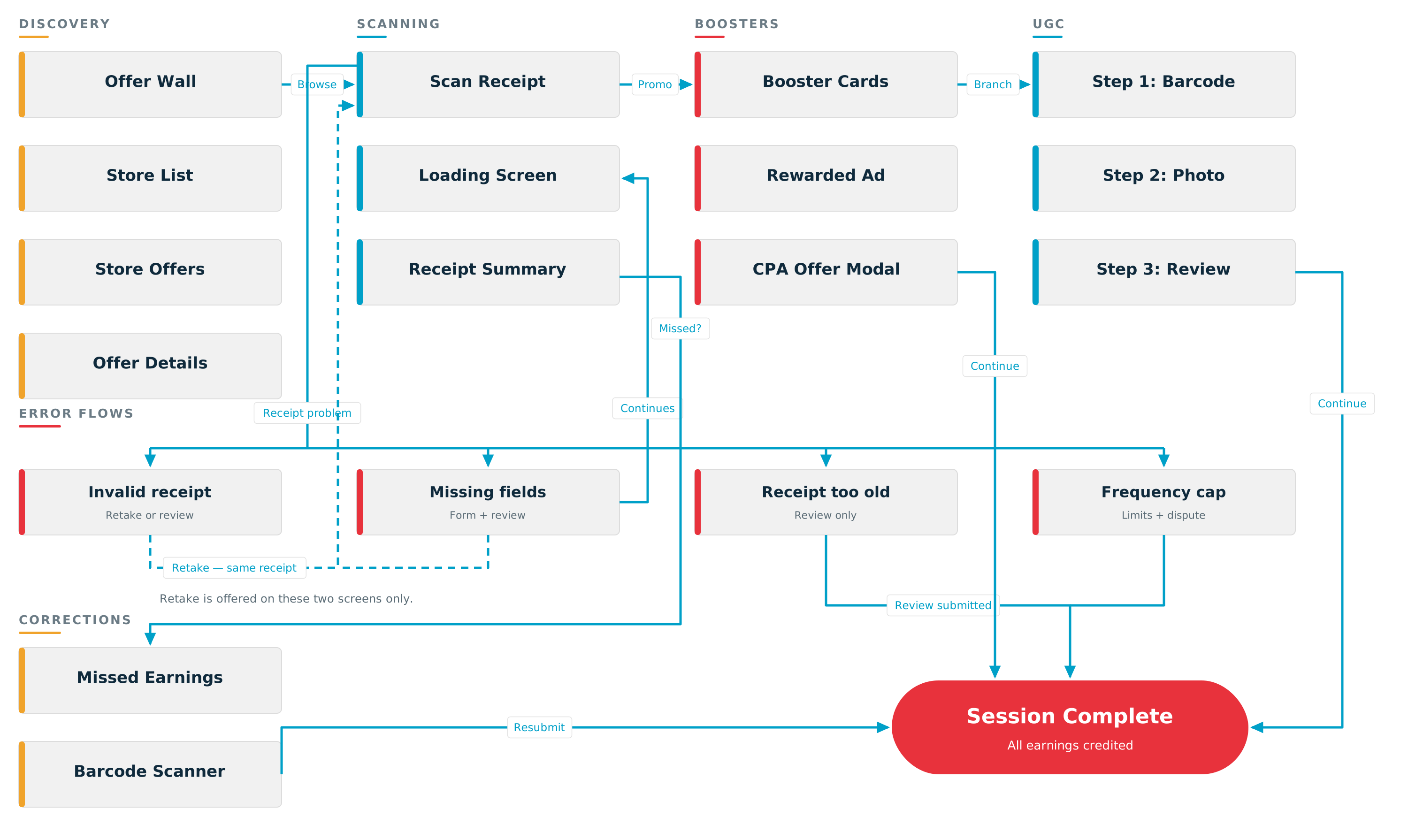
Error Flows
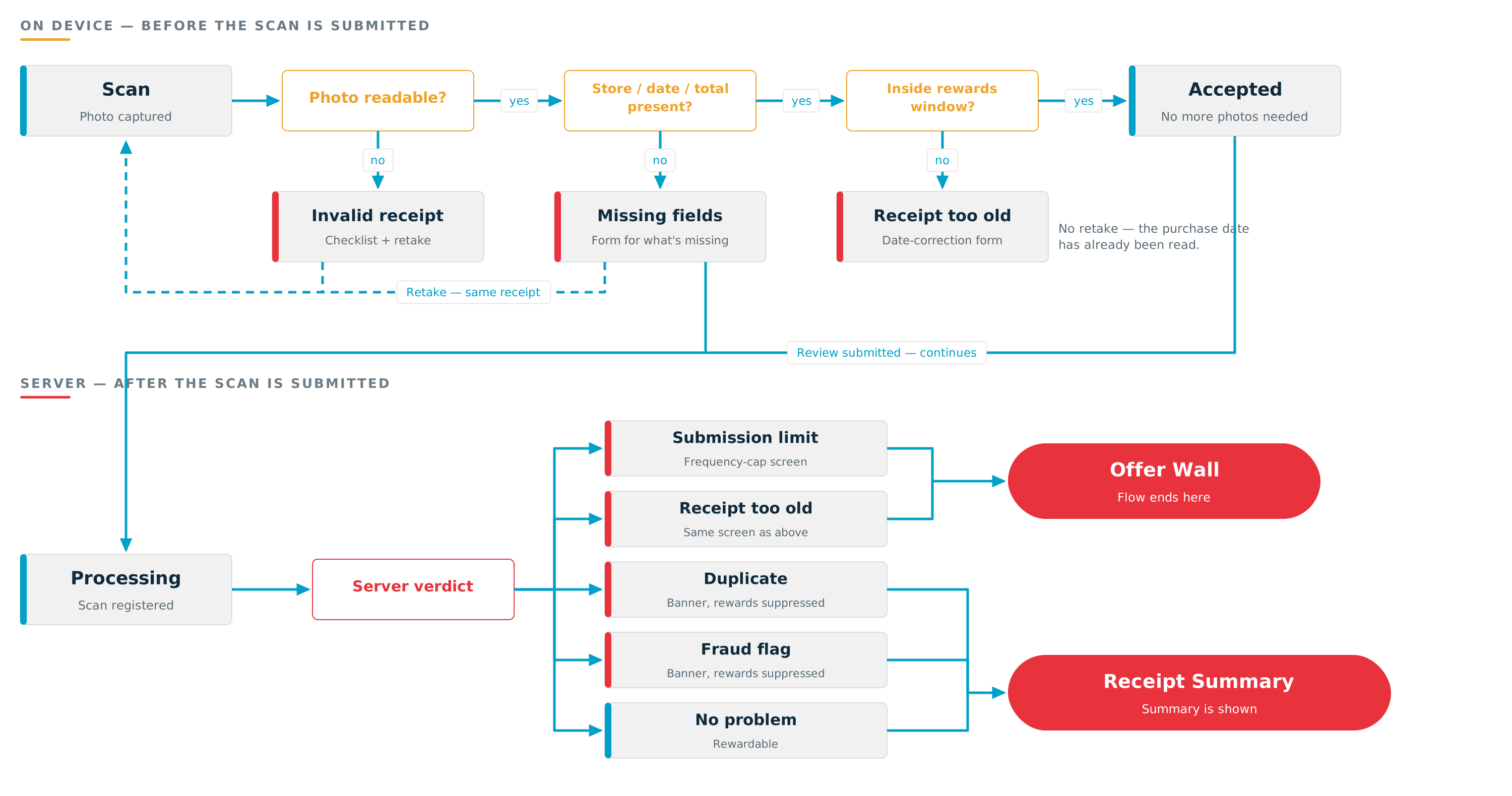
A receipt that can't be processed doesn't end the journey. Each problem raises its own screen offering a review request, and the shopper returns to the offer wall — or, for a missing field, continues on to their Receipt Summary. The checks run in two tiers: on device before the scan is submitted, and on the server after. See Error Flows for the full behavior.
Client-Side Offer Feed
With the Client-Side Offer Feed, offer discovery can start in your app's own UI instead of the offer wall. Your app loads the feed and renders it. A tap hands the shopper to the SDK's offer details or group list. Closing those screens hands the shopper back to your app. See Starting from your app's own UI for each step.

Reward Earning Opportunities

Reward Callback Contexts
| Context | Triggered By | Payload | Reward Timing |
|---|---|---|---|
| ScanFinished | Receipt processing completes | Scan results + base reward base_scan | Instant |
| Promo | Products qualify for promotions | Promotional reward total promo | Pending review — minutes to days |
| Boost | User completes rewarded ad/CPA offer | Boost reward amount boost | Instant |
| BarcodeCollection | User completes UGC product capture. iOS only for now — Android will emit it once User Generated Content is supported on Android. | Task reward amount barcode_collection | Instant |
| BoostCreditEarned | User completes a Google rewarded boost (hard currency mode only) | Earned amount held for future scan | Applied on a later scan via BoostCreditApplied |
| BoostCreditApplied | Receipt summary opens with hard currency credits assigned to this scan (hard currency mode only) | Credit amount | Instant |
On iOS (1.12.0+), the base reward a ScanFinished scan earns is your app's amount, unless Actual has configured an amount for the receipt's store. In that case Actual's amount replaces yours, on the Receipt Summary and in the base_scan webhook. See Store-specific base scan reward.
Hard Currency Mode
Hard currency mode is enabled per-app by a BlinkEngage admin — no host-app configuration is required. When active, the SDK fires BoostCreditEarned after a Google rewarded boost completes instead of the immediate Boost callback. The earned amount is held and surfaced on a later scan as BoostCreditApplied. When the app is not in hard currency mode, Google rewarded boosts follow the immediate Boost path.
Error Flows Summary
A receipt problem raises a screen, not a dead end. Every row below offers the shopper a way forward — usually a retake, always a review request. See Error Flows for how the checks are ordered and when the reward lands.
| Scenario | What the shopper sees | What they can do | Where it ends |
|---|---|---|---|
| Photo can't be read | Invalid-receipt screen with a checklist of what to check | Retake the photo, or submit it for review as-is | Offer wall |
| Date or total missing | A short form asking only for what's missing | Fill it in and submit, or retake the photo | Receipt Summary — the scan continues to processing |
| Store name missing (only) | Nothing — the scan is treated as complete | Nothing to do; the store is read during review | Receipt Summary, store left blank |
| Receipt older than the rewards window | Receipt-too-old screen with a date-correction form | Request a review with the correct date (no retake — the date has already been read) | Offer wall |
| Receipt already submitted | Receipt Summary with a duplicate banner, rewards suppressed | Dispute the match with an optional comment | Receipt Summary |
| Receipt carries an actionable fraud flag | Receipt Summary with an invalid banner, rewards suppressed | Dispute it with an optional comment | Receipt Summary |
| A submission limit was hit | Frequency-cap screen naming each limit and its value | Dispute the limit | Offer wall |
These remaining cases are genuine failures rather than review flows — there is nothing for a reviewer to decide:
| Journey | Error Scenario | User Message |
|---|---|---|
| Receipt Scanning | Network timeout | "Unable to process. Please try again." |
| Receipt Boosters | Ad failed to load | Booster not shown (graceful degradation) |
| Product Capture (UGC) | Barcode timeout | "Barcode not captured. Try again." |
| Product Capture (UGC) | Upload failed | "Something didn't work. Please try again." |
Step-by-step User Journeys
1. Offer Discovery & Clipping
Goal: Users browse available offers and save them for future shopping trips.
| Step | User Action | Actual Experience |
|---|---|---|
| 1 | Opens the rewards section | Offer Wall displays with personalized offers |
| 2 | Browses offers by store or category | Offers organized into sections (Featured, All Offers, by Retailer) |
| 3 | Taps "More Stores" | Modal shows all participating retailers with offer counts |
| 4 | Selects a specific retailer | Filtered list shows only that retailer's offers |
| 5 | Taps on an offer card | Detail sheet shows requirements, reward value, qualifying products |
| 6 | Taps "Clip" button | Offer saved to account; button changes to "Clipped" |
| 7 | Returns to Offer Wall | Clipped offers show checkmark indicator |
Outcome: User has saved offers that will automatically apply when they scan a qualifying receipt.
Starting from your app's own UI (Client-Side Offer Feed)
Offer discovery doesn't have to start in the offer wall. With the Client-Side Offer Feed, your app shows the offers in its own UI and hands the shopper to the SDK on a tap. The flow diagram shows the same steps.
| Step | Who | What happens |
|---|---|---|
| 1 | Your app | The screen that shows offers appears and asks the SDK for the feed. |
| 2 | SDK | Fetches this user's curated offers from Actual and returns them as ranked groups, with reward values already in your currency. If the user's registration is still in progress, the request waits for it. |
| 3 | Your app | Renders the groups with its own cards, and the shopper browses. |
| 4 | Shopper, your app | The shopper taps an offer or a group's "See all". Your app hands the tapped offer or group to the SDK. |
| 5 | SDK | Opens the offer's details, or the group's full list of offers. |
| 6 | Shopper | Clips the offer or scans a receipt, exactly as in the offer wall. |
| 7 | Shopper | Closes the SDK's screens and is back on your screen. |
| 8 | Your app | Refreshes the feed when it may be stale, for example when the screen returns to the foreground. |
The Client-Side Offer Feed is available on iOS from 1.14.0; Android support is coming in a future release. On iOS, your app hands the shopper back and forth like this:
iOS (1.14.0+) | |
|---|---|
| Load the feed | Call loadOfferFeed(completion:) on BlinkEngageSDK.shared |
| Hand back a tap | Present or push the screen returned by offerDetailsViewController(for:) or offerGroupViewController(for:) |
| Navigation | Your app's navigation shows the SDK's screen. Dismissing it returns the shopper to your screen. |
| Staying current | Reload the feed when it may be stale. The entry points return nil for an offer or group that is no longer in the latest feed. |
| Reporting interactions | Report each offer that appears, each tap, and each "View all" with reportOfferFeedEvent(_:) |
| Feed turned off for your app | loadOfferFeed fails with error code 2 (feed unavailable) |
See iOS Client-Side Offer Feed for the full integration.
2. Receipt Scanning (Core Flow)
Goal: Users scan a store receipt to earn rewards on qualifying purchases.
| Step | User Action | Actual Experience |
|---|---|---|
| 1 | Taps "Scan Receipt" button | Camera activates for receipt capture |
| 2 | Photographs the receipt | Receipt is checked on device before it is submitted |
| 3 | (only if something's wrong) | A screen explains the problem and offers a retake or a review request — see below |
| 4 | Waits on loading screen | Brief ad displays while system processes receipt |
| 5 | Views Receipt Summary | Screen shows: total rewards earned, qualifying products, bonus opportunities |
| 6 | Sees celebratory animation | Confetti and sound confirm rewards earned |
| 7 | Reviews product list | Each product shows reward status and any bonus opportunities |
| 8 | Taps "Continue" | Session completes; rewards credited to account |
Outcome: User earns points for qualifying purchases found on their receipt.
If something's wrong with the receipt
Step 3 is the branch. Nothing here ends the journey — each case offers a retake, a review request, or both, and a retake reopens the camera on the same receipt rather than starting over.
| Problem | Shopper's next step | Then |
|---|---|---|
| Photo can't be read | Retake, or send it for review as-is | Back to the offer wall |
| Date or total missing | Type in what's missing, or retake | Continues to the Receipt Summary |
| Receipt too old, limit hit, duplicate, or fraud flag | Request a review, optionally with a comment | Offer wall, or a summary with rewards suppressed |
A scan that ends at a review request earns nothing yet — the reward is granted only if a reviewer accepts, and arrives later by webhook. See Error Flows Summary for every case and Error Flows for the mechanics.
3. Receipt Boosters (Rewarded Ads)
Goal: Users earn bonus rewards by watching ads or completing partner offers after scanning a receipt.
| Step | User Action | Actual Experience |
|---|---|---|
| 1 | Completes receipt scan | Receipt Summary displays with scan rewards |
| 2 | Sees Booster cards appear | Up to 3 bonus offers slide in from top (after 2-second delay) |
| 3 | Views Booster options | Each card shows: brand logo, title, description, reward amount |
| 4 | Option A: Taps reward button | |
| 4a | (If Rewarded Ad) | Full-screen video ad plays |
| 4b | (If CPA Offer) | Partner offer modal displays with "Redeem" option |
| 5 | Completes the ad/offer | Confetti animation plays; bonus points added |
| 6 | Sees updated total | Points counter animates incrementally to new total |
| 7 | Option B: Taps "Skip" | Booster dismissed; next booster shown (if available) |
| 8 | Exhausts all boosters | Message: "No more boosts available at this time" |
Boost Types:
| Type | User Action Required | Reward Timing |
|---|---|---|
| Rewarded Video Ad | Watch complete video | Instant credit |
| CPA Offer | Accept partner offer (e.g., sign up) | Instant credit |
Outcome: User earns bonus points on top of their scan rewards.
4. Product Capture (UGC Tasks)
Goal: Users photograph specific products to earn additional rewards and help improve product data.
| Step | User Action | Actual Experience |
|---|---|---|
| 1 | Views Receipt Summary | Products with UGC tasks show blue highlight and camera icon |
| 2 | Taps camera button on product | Product Capture screen opens (full-screen modal) |
| 3 | Step 1 of 2: Scans barcode | Camera auto-detects product barcode |
| 4 | Positions barcode in frame | System recognizes UPC; shows confirmation badge |
| 5 | Step 2 of 2: Takes product photo | User photographs front of product |
| 6 | Reviews captured photo | Preview displays with "Retake" or "Submit" options |
| 7 | Taps "Submit" | Loading spinner while image uploads |
| 8 | Submission succeeds | Returns to Receipt Summary; confetti plays; points added |
| 9 | Product shows completed | Blue highlight remains; reward badge shows "+X pts" |
Error Handling:
| Scenario | User Experience |
|---|---|
| Barcode timeout (10s) | Message: "Barcode not captured. Make sure camera is focused." |
| Upload fails | Error screen with "Try Again" or "Back to Rewards" options |
Visual Guidance Throughout:
- Step indicator shows "Step 1 of 2" → "Step 2 of 2"
- Product name badge visible throughout
- UPC badge appears after successful barcode scan
- Clear instructional text at each step
Outcome: User earns task-based rewards while contributing valuable product data.
5. Missed Earnings (Corrections)
Goal: Users correct receipt data when products weren't properly recognized.
Both send a correction to a human reviewer, but they answer different questions. Missed earnings is for a receipt that processed fine yet paid less than the shopper expected — a product the scan didn't recognize. A review request (Error Flows) is for a receipt the SDK couldn't accept in the first place — unreadable, incomplete, too old, or flagged. A receipt can go through both.
| Step | User Action | Actual Experience |
|---|---|---|
| 1 | Notices missing products on Receipt Summary | "Missed Earnings" button visible in header |
| 2 | Taps "Missed Earnings" | Edit screen opens showing receipt data |
| 3 | Reviews trip info | Store name, date, and product list displayed |
| 4 | Taps "Edit" button | Fields become editable |
| 5 | Corrects store name | Dropdown shows suggested retailers |
| 6 | Corrects purchase date | Date picker opens (future dates disabled) |
| 7 | Taps "Add Missing Product" | Barcode scanner opens |
| 8 | Scans product barcode | Product added to list with "Pending Review" label |
| 9 | Taps "Submit" | Corrections queued for manual review |
| 10 | Sees confirmation | Products show "Pending Review" status |
Outcome: User submits corrections for manual review; credits applied if approved.